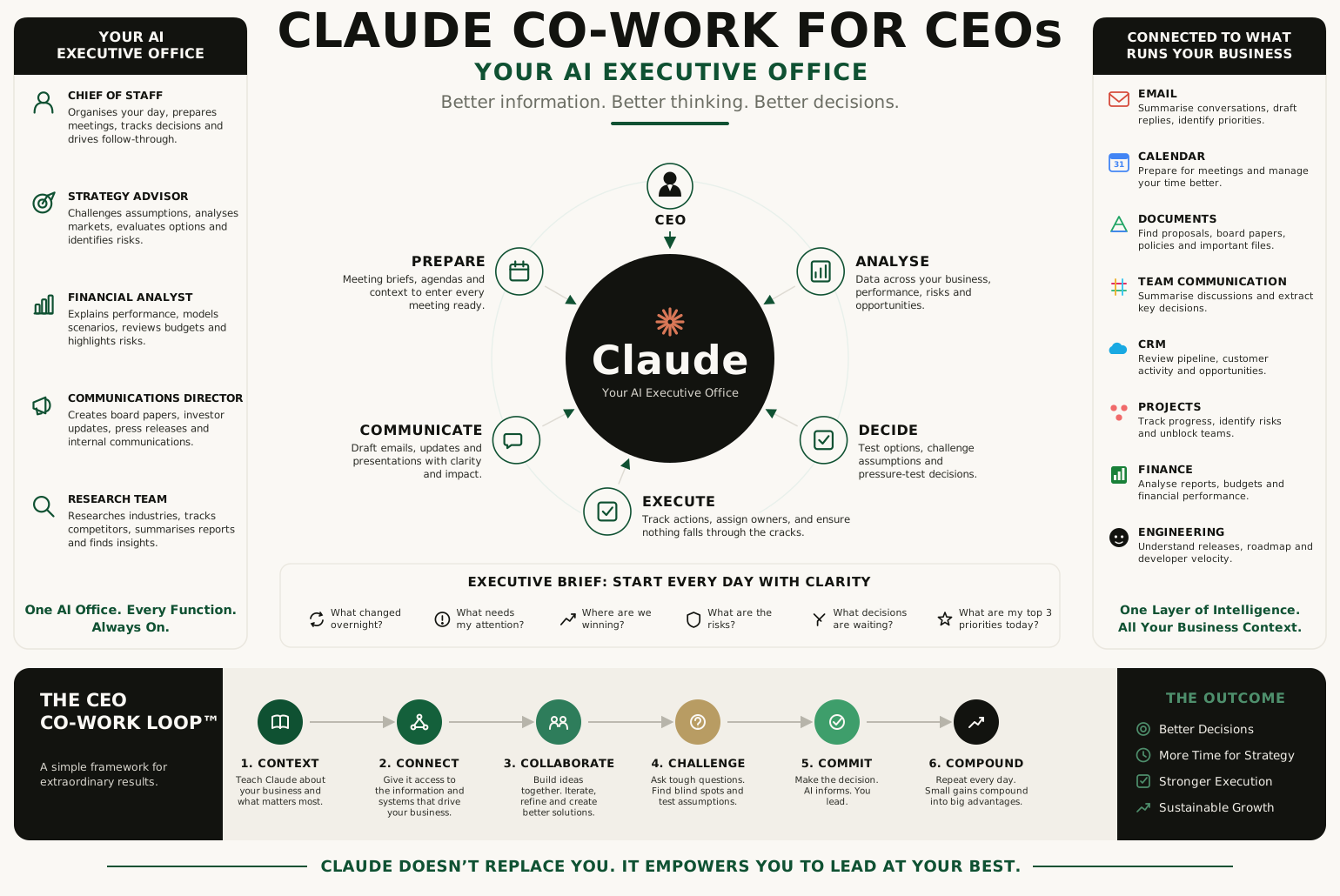
The CEO's job has never been to answer every question. It is to make the best possible decisions with imperfect information. For forty years, enterprise software helped executives organise work — email organised communication, CRM organised customers, ERP organised operations, project tools organised execution. AI introduces a different layer. It organises thinking.
Most CEOs still use Claude like an advanced chatbot — write this email, summarise that report, draft these slides. Useful, but barely the surface. The real opportunity is an AI Executive Office: a digital Chief of Staff that reads first, researches first, analyses first, drafts first, and challenges your assumptions before you commit. This is not about replacing executives. It is about giving every executive, including you, an exceptional thinking partner. Here is how to build it — ten short lessons, each with the exact prompt to use.
Lesson 01 Stop prompting. Start co-working.
Most people think AI is about writing better prompts. It is not. It is about building a better working relationship. Imagine hiring an exceptional Chief of Staff, asking them one question on Monday, then dismissing them and re-hiring them from scratch on Tuesday. That is how most executives use AI — a series of isolated tasks instead of an ongoing collaboration. Claude performs best when it understands your business, your objectives and your way of thinking, carried across conversations.
Prompting
"Write me a board presentation."A one-shot task. You get output, you edit it, the context is gone tomorrow. The tool never gets smarter about your business.
Co-working
"Help me think through it."A working session. You build the narrative together, it challenges you, and the context compounds into the next conversation.
"Help me think through our next board presentation. Before drafting anything, ask me what outcome I want from the board, challenge my assumptions, identify the three biggest risks a sceptical director would raise, and help me build the strongest possible narrative. Push back where I'm being optimistic."
That single shift — from "write" to "help me think through" — changes the relationship. You are no longer using software. You are working with a strategic partner.
Lesson 02 Build your Company Brain.
Every new executive needs onboarding, and Claude is no different. Before asking it to solve problems, give it a foundation: a single document that explains your business. This becomes your Company Brain — and because the quality of AI output tracks the quality of context, it is quietly the highest-leverage ten minutes you will spend. Context is the CEO's competitive advantage.
How to set it up in ten minutes. Don't write it from a blank page — have Claude interview you and assemble it for you.
- Open a dedicated Claude Project called "Company Brain" (Projects keep context attached to every chat inside them).
- Run the interview prompt below and answer in plain language — bullet points are fine.
- Ask Claude to compile your answers into a clean one-page brief, then save that brief into the Project's knowledge so every future conversation starts from it.
"You're going to help me build a one-page 'Company Brain' that you'll use as context for all our future work. Interview me one question at a time, starting with what the company does and who it's for. Keep going through business model, competitors, org structure, this year's objectives, KPIs and our internal terminology. When we're done, compile everything into a single structured brief I can save and reuse."
Lesson 03 Connect Claude to your business.
The biggest leap in value comes when Claude can work with the information your company already creates — instead of you uploading documents every day. Connect it to the systems that power the business and treat it as the intelligence layer sitting above your stack. The goal is not to replace these tools; it is to connect them, because decision-making improves when information is joined up.
Connect the systems, not replace them.
Practical note: connect read-access first, involve whoever owns security, and begin with the two or three systems you touch every day. You do not need everything wired up to feel the difference.
Lesson 04 Start every day with an Executive Brief.
Most CEOs begin the day inside their inbox. AI-native CEOs begin with clarity. A daily Executive Brief — five minutes of a high-quality summary — is worth more than thirty minutes hunting through email, chat and reports. Your job is not to read everything. It is to know what matters.
"Using my connected email, calendar, CRM and project tools, give me my Executive Brief for today. Cover: what changed since yesterday; which customers or deals need my attention; which projects are at risk; which meetings I need to prepare for; any financial changes that matter; anything escalating. End with the three most important decisions I should make today, and the one thing most people would miss."
Make it automatic. Once the brief is good, schedule it. Ask Claude to run this same prompt every weekday morning and deliver it before you start — so clarity arrives to you, rather than you going to find it.
Lesson 05 Turn Claude into your Chief of Staff.
Every important meeting should begin before you enter the room, and it should not end when people leave it. Bookend each meeting with two prompts — one to prepare you, one to convert the conversation into execution.
"I have a meeting with [names / company] at [time]. Prepare me: who's attending and what matters to them, a summary of our previous discussions, any outstanding decisions, the relevant commercial or financial context, the objections I should expect, the questions I should ask, and the outcome I should aim for."
"Here are my notes from that meeting [paste or dictate]. Summarise the key decisions, list the action items with owners, draft the follow-up email, note anything left unresolved, and tell me what to update in our project docs."
Lesson 06 Build your AI leadership team.
Instead of using one conversation for everything, assign Claude executive roles. You are not replacing your human leaders — you are giving each of them, and yourself, a world-class analyst who has read everything and has no ego in the fight.
Give every function an analyst that never sleeps.
The board's mind
The number
The truth-teller
The narrative
The engine
"Act as my Chief Revenue Officer. Using our CRM and this quarter's targets, review the pipeline: where's the risk, which deals are slipping, where's the realistic upside, and what two actions would most improve the number this month? Be direct — tell me what a sharp CRO would say, not what's comfortable."
Lesson 07 Never decide alone.
Claude's greatest strength is not generating answers. It is asking better questions. Great CEOs actively seek disagreement before committing — and here you have an intelligent counterpoint available every single time. The purpose is not to let AI decide; it is to raise the quality of your judgement.
"I'm about to decide [the decision]. Before I commit, challenge me: what assumptions am I making, what evidence contradicts my thinking, what would our smartest competitor do differently, what would a tough investor attack, what are the second-order consequences, and if this fails in twelve months, what will most likely have caused it? Argue the opposite case as strongly as you can."
Lesson 08 Build repeatable CEO workflows.
The biggest gains come from systems, not one-off prompts. Turn the prompts above into a cadence, and the return compounds — the more repeatable the workflow, the more valuable it becomes.
From prompts to a rhythm.
Lesson 09 Use Claude to think, not just write.
Most executives use AI for content. The highest-performing CEOs use it for strategic thinking — writing is simply the output; the better thinking is the real value. Point it at the hard, ambiguous questions.
"Compare our two strategic options — [A] and [B]. For each: the strongest case for it, the strongest case against, how a key competitor would likely respond, the second-order effects, and the conditions under which it fails. Then tell me what I'm not considering, and what an experienced board director would push me on."
Ask it to compare strategic options, simulate competitor responses, pressure-test a business plan, review an acquisition, or hunt for the blind spot you can't see. The document it produces matters less than the thinking it forces.
Lesson 10 The CEO Co-Work Loop.
Every AI-native CEO runs the same six-step loop. The value compounds, because with each turn Claude understands your business, your leadership style and your priorities a little more deeply.
Teach Claude about your company — the Company Brain from Lesson 2.
Give it access to the information it needs to be useful — Lesson 3.
Build ideas together through conversation, not one-shot tasks.
Insist it questions your assumptions and argues the other side.
Remember the division of labour: AI informs decisions; leaders make them.
Repeat every day. The relationship — and the advantage — grows with use.
Claude doesn't replace your existing technology. It helps you think across it. That is the difference.
The mistakes that waste it.
The executives who get the least from AI tend to make the same errors. Avoid these and you are most of the way there.
The future CEO.
Every major technological revolution has redefined executive leadership. The spreadsheet changed finance. The internet changed research. Cloud computing changed collaboration. AI is changing decision-making. The CEOs who outperform over the next decade will not necessarily work longer hours — they will make better decisions, spot opportunities faster, challenge assumptions earlier, and spend less time managing information and more time leading people. That is the real promise of AI: not automation, but augmentation.
Automation
Does the work for youUseful, and mostly about efficiency — the same output with less effort. Necessary, but not where the advantage is.
Augmentation
Makes you a better leaderBetter decisions, earlier. The scarce resource in any company is executive judgement — this is a multiplier on it.
The question was never whether CEOs will use AI; every CEO eventually will. The question is whether they keep treating it as another productivity tool, or build an AI Executive Office that changes how they lead. The organisations that make the shift won't simply become more efficient. They'll become more informed, more aligned, more decisive — and, in the end, more competitive. The future CEO won't work alone. They'll co-work with AI every single day.